

Next Steps for Verification
To avoid delay in the processing of your federal student aid, please complete the form identified by Principia’s Financial Aid Officer.
In order to submit the verification form, you will need to fill it out, save with changes and then download to your personal computer. You will know which form to complete based on communication from the Principia College Financial Aid Office. Note that for the V4 form, you cannot submit it electronically. Follow the instructions within the form.
Follow these steps after opening the form:
- Fill out all fields
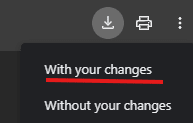
- Save WITH CHANGES using the top right hand icon (DO NOT RIGHT CLICK on your mouse)
You will see the below option when you select the download/save button in the top right hand corner. - Save with changes
- Save on your personal computer
- Name the file using this format: FIRST_LAST_FAFSA_VERIFICATION.pdf
To submit, follow the prompts to upload your file.